
Clustering
Introducción
Aprendizaje supervisado
- Algoritmo es guiado en el proceso de aprendizaje (se le indica qué debe aprender)
- En algoritmo de regresión lineal, el modelo calcula parámetros que mejor se ajustan a datos conocidos
- ¿Qué ocurre si no contamos con esta información?
- Respuesta: Algoritmos no supervisados
Aprendizaje no supervisado
- No existe información previa sobre qué es lo que debe aprender el algoritmo
- El algoritmo tiene libertad para aprender patrones de interés en los datos
Agrupamiento (Clustering)
- Al igual que en clasificación, clustering asigna cada dato a un grupo
- En el caso de clustering, los grupos no son conocidos de antemano
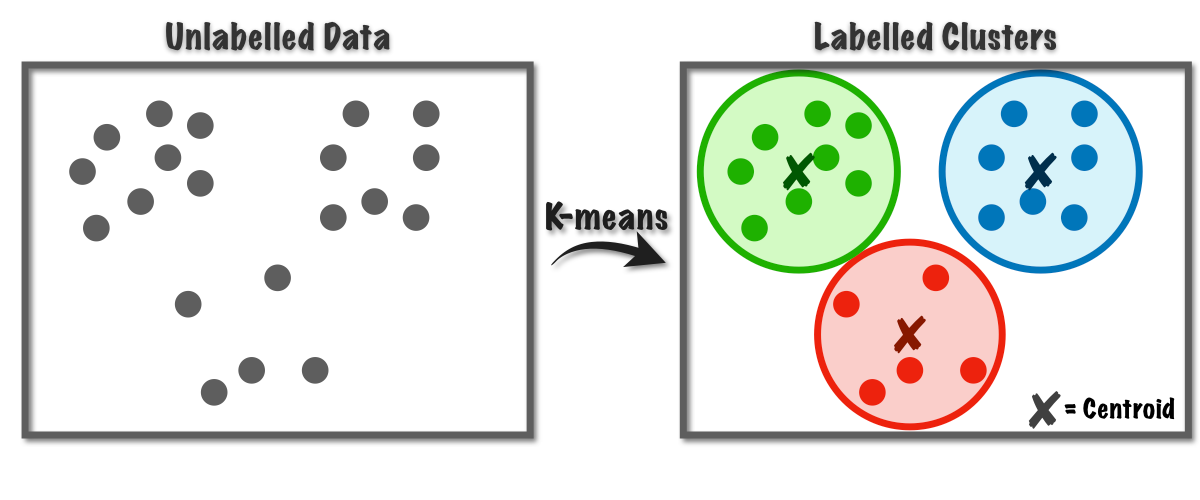
K-Means
- K-Means permite agrupar datos a partir de un número especificado de clusters.
- Para K-Means es necesario especificar el número de clusters de antemano. En algunos casos este número sera obvio, pero en otros no.
- Cada clúster se marca inicialmente con un centroide. Este se va actualizando hasta ajustarse a las agrupaciones existentes
In [1]:
Copied!
from sklearn.datasets import load_iris
import matplotlib.pyplot as plt

iris = load_iris()
X = iris.data[:,2:]
y = iris.target

fig = plt.figure(figsize=(13,4))
ax1 = fig.add_subplot(1,2,1)
ax1.plot(X[y==0,0],X[y==0,1],'yo')
ax1.plot(X[y==1,0],X[y==1,1],'bs')
ax1.plot(X[y==2,0],X[y==2,1],'g^')
ax1.legend(['Iris-Setosa','Iris-Versicolor','Iris-Virginica'])
ax1.set_xlabel('Petal length')
ax1.set_ylabel('Petal width')


ax2 = fig.add_subplot(1,2,2)
ax2.plot(X[:, 0],X[:,1],'k.')
ax2.set_xlabel('Petal length')
ax2.set_ylabel('Petal width')
from sklearn.datasets import load_iris
import matplotlib.pyplot as plt
iris = load_iris()
X = iris.data[:,2:]
y = iris.target
fig = plt.figure(figsize=(13,4))
ax1 = fig.add_subplot(1,2,1)
ax1.plot(X[y==0,0],X[y==0,1],'yo')
ax1.plot(X[y==1,0],X[y==1,1],'bs')
ax1.plot(X[y==2,0],X[y==2,1],'g^')
ax1.legend(['Iris-Setosa','Iris-Versicolor','Iris-Virginica'])
ax1.set_xlabel('Petal length')
ax1.set_ylabel('Petal width')
ax2 = fig.add_subplot(1,2,2)
ax2.plot(X[:, 0],X[:,1],'k.')
ax2.set_xlabel('Petal length')
ax2.set_ylabel('Petal width')
Out[1]:
Text(0, 0.5, 'Petal width')

In [9]:
Copied!
# Entrenamiento de K-Means
from sklearn.cluster import KMeans

k = 3 # Este es el número de agrupaciones (nuestro supuesto)
kmeans = KMeans(n_clusters=k)
# OJO, no es que nos falte la división en training y test. NO es necesaria en este caso.
kmeans.fit(X)

y_pred = kmeans.predict(X)
# Entrenamiento de K-Means
from sklearn.cluster import KMeans
k = 3 # Este es el número de agrupaciones (nuestro supuesto)
kmeans = KMeans(n_clusters=k)
# OJO, no es que nos falte la división en training y test. NO es necesaria en este caso.
kmeans.fit(X)
y_pred = kmeans.predict(X)
In [10]:
Copied!
import matplotlib.pyplot as plt

fig = plt.figure(figsize=(13,4))
ax1 = fig.add_subplot(1,2,1)
ax1.plot(X[y==0,0],X[y==0,1],'yo')
ax1.plot(X[y==1,0],X[y==1,1],'bs')
ax1.plot(X[y==2,0],X[y==2,1],'g^')
ax1.legend(['Iris-Setosa','Iris-Versicolor','Iris-Virginica'])
ax1.set_xlabel('Petal length')
ax1.set_ylabel('Petal width')

# Índice de agrupación cambia, pero agrupaciones se mantienen
ax2 = fig.add_subplot(1,2,2)
ax2.plot(X[y_pred==0,0],X[y_pred==0,1],'yo')
ax2.plot(X[y_pred==1,0],X[y_pred==1,1],'g^')
ax2.plot(X[y_pred==2,0],X[y_pred==2,1],'bs')
# ax2.plot(X[y_pred==3,0],X[y_pred==3,1],'k*')
ax2.set_xlabel('Petal length')
ax2.set_ylabel('Petal width')

plt.show()

# Score representa la inercia del modelo (distancia cuadrática media entre cada dato y su centroide)
# Se muestra con valor negativo pues método score de scikit learn debe cumplir con
# "mayor valor, mejor"
print(kmeans.score(X))
import matplotlib.pyplot as plt
fig = plt.figure(figsize=(13,4))
ax1 = fig.add_subplot(1,2,1)
ax1.plot(X[y==0,0],X[y==0,1],'yo')
ax1.plot(X[y==1,0],X[y==1,1],'bs')
ax1.plot(X[y==2,0],X[y==2,1],'g^')
ax1.legend(['Iris-Setosa','Iris-Versicolor','Iris-Virginica'])
ax1.set_xlabel('Petal length')
ax1.set_ylabel('Petal width')
# Índice de agrupación cambia, pero agrupaciones se mantienen
ax2 = fig.add_subplot(1,2,2)
ax2.plot(X[y_pred==0,0],X[y_pred==0,1],'yo')
ax2.plot(X[y_pred==1,0],X[y_pred==1,1],'g^')
ax2.plot(X[y_pred==2,0],X[y_pred==2,1],'bs')
# ax2.plot(X[y_pred==3,0],X[y_pred==3,1],'k*')
ax2.set_xlabel('Petal length')
ax2.set_ylabel('Petal width')
plt.show()
# Score representa la inercia del modelo (distancia cuadrática media entre cada dato y su centroide)
# Se muestra con valor negativo pues método score de scikit learn debe cumplir con
# "mayor valor, mejor"
print(kmeans.score(X))

-31.37135897435897
Método del codo
- En caso de no conocer el número de clusters, una buena aproximación es el método del codo
- Se selecciona como número de clusters a aquel que produce el último decremento importante en la inercia.
In [11]:
Copied!
score = []
k_clusters = range(1,20) # Este range va de 1 a 20
for k in k_clusters:
    kmeans = KMeans(n_clusters=k)
    kmeans.fit(X)
    score.append(-kmeans.score(X))

plt.plot(k_clusters, score,'b.-')
score = []
k_clusters = range(1,20) # Este range va de 1 a 20
for k in k_clusters:
kmeans = KMeans(n_clusters=k)
kmeans.fit(X)
score.append(-kmeans.score(X))
plt.plot(k_clusters, score,'b.-')
Out[11]:
[<matplotlib.lines.Line2D at 0x7f15945fbe80>]

Agrupamiento Jerárquico
- Algoritmo que define jerarquía en los datos para generar agrupaciones
- Agrupamiento aglomerativo: A partir de los datos individuales, se agrupan gradualmente hasta formar uno o mútiples grandes grupos. Aproximación bottom up.
- Agrupamiento divisional: A partir de los datos agrupados, se dividen gradualmente hasta formar mútiples grupos pequeños. Aproximación Up bottom
In [17]:
Copied!
from sklearn.cluster import AgglomerativeClustering

# Escalamiento "puede" mejorar clusterings generados
# # Escalamiento de datos
# scaler = StandardScaler()
# # Ajustar y transformar datos
# X_scaled = scaler.fit_transform(X)


agg_cluster = AgglomerativeClustering(n_clusters=3)
y_pred = agg_cluster.fit_predict(X)
from sklearn.cluster import AgglomerativeClustering
# Escalamiento "puede" mejorar clusterings generados
# # Escalamiento de datos
# scaler = StandardScaler()
# # Ajustar y transformar datos
# X_scaled = scaler.fit_transform(X)
agg_cluster = AgglomerativeClustering(n_clusters=3)
y_pred = agg_cluster.fit_predict(X)
In [13]:
Copied!
print(y_pred)
print(y_pred)
[1 1 1 1 1 1 1 1 1 1 1 1 1 1 1 1 1 1 1 1 1 1 1 1 1 1 1 1 1 1 1 1 1 1 1 1 1
 1 1 1 1 1 1 1 1 1 1 1 1 1 2 2 0 2 2 2 2 2 2 2 2 2 2 2 2 2 2 2 2 2 0 2 0 2
 2 2 2 0 2 2 2 2 2 0 2 2 2 2 2 2 2 2 2 2 2 2 2 2 2 2 0 0 0 0 0 0 2 0 0 0 0
 0 0 0 0 0 0 0 0 0 0 0 0 0 0 0 0 0 0 0 0 0 0 0 0 0 0 0 0 0 0 0 0 0 0 0 0 0
 0 0]
In [14]:
Copied!
import matplotlib.pyplot as plt

fig = plt.figure(figsize=(13,4))
ax1 = fig.add_subplot(1,2,1)
ax1.plot(X[y==0,0],X[y==0,1],'yo')
ax1.plot(X[y==1,0],X[y==1,1],'bs')
ax1.plot(X[y==2,0],X[y==2,1],'g^')
ax1.legend(['Iris-Setosa','Iris-Versicolor','Iris-Virginica'])
ax1.set_xlabel('Petal length')
ax1.set_ylabel('Petal width')

# Índice de agrupación cambia, pero agrupaciones se mantienen
ax2 = fig.add_subplot(1,2,2)
ax2.plot(X[y_pred==0,0],X[y_pred==0,1],'g^')
ax2.plot(X[y_pred==1,0],X[y_pred==1,1],'yo')
ax2.plot(X[y_pred==2,0],X[y_pred==2,1],'bs')
ax2.set_xlabel('Petal length')
ax2.set_ylabel('Petal width')

plt.show()
import matplotlib.pyplot as plt
fig = plt.figure(figsize=(13,4))
ax1 = fig.add_subplot(1,2,1)
ax1.plot(X[y==0,0],X[y==0,1],'yo')
ax1.plot(X[y==1,0],X[y==1,1],'bs')
ax1.plot(X[y==2,0],X[y==2,1],'g^')
ax1.legend(['Iris-Setosa','Iris-Versicolor','Iris-Virginica'])
ax1.set_xlabel('Petal length')
ax1.set_ylabel('Petal width')
# Índice de agrupación cambia, pero agrupaciones se mantienen
ax2 = fig.add_subplot(1,2,2)
ax2.plot(X[y_pred==0,0],X[y_pred==0,1],'g^')
ax2.plot(X[y_pred==1,0],X[y_pred==1,1],'yo')
ax2.plot(X[y_pred==2,0],X[y_pred==2,1],'bs')
ax2.set_xlabel('Petal length')
ax2.set_ylabel('Petal width')
plt.show()

In [15]:
Copied!
# Dendograma (gráfico de conexiones de agrupamientos)
import scipy.cluster.hierarchy as sch
from sklearn.preprocessing import StandardScaler

plt.figure(figsize = (15, 6))
sch.dendrogram(sch.linkage(X, method = 'ward'))
plt.xlabel('Data Points');
# Dendograma (gráfico de conexiones de agrupamientos)
import scipy.cluster.hierarchy as sch
from sklearn.preprocessing import StandardScaler
plt.figure(figsize = (15, 6))
sch.dendrogram(sch.linkage(X, method = 'ward'))
plt.xlabel('Data Points');

DBSCAN
- Density-based spatial clustering of applications with noise
- Algoritmo capaz de identificar clúster de agrupación en base a la "densidad" de los datos.
- Paso a paso:
- Por cada instancia, se cuentan cuántas instancias están dentro de una distancia $\epsilon$ (vecindario $\epsilon$)
- Si una instancia tienen al menos
min_samplesinstancias en su vecindario, es considerada una instanciacore. - Todas las instancias en el vecindario de una instancia core pertenecen al mismo clúster (incluídas otras instancias core).
- Cualquier instancia que no sea una instancia core o no pertenezca a un vecindario, es considerada anomalía.
In [ ]:
Copied!
from sklearn.cluster import DBSCAN

dbscan = DBSCAN(eps=0.2, min_samples=4)
y_pred = dbscan.fit_predict(X)
print(y_pred)
from sklearn.cluster import DBSCAN
dbscan = DBSCAN(eps=0.2, min_samples=4)
y_pred = dbscan.fit_predict(X)
print(y_pred)
In [ ]:
Copied!
import matplotlib.pyplot as plt

fig = plt.figure(figsize=(13,4))
ax1 = fig.add_subplot(1,2,1)
ax1.plot(X[y==0,0],X[y==0,1],'yo')
ax1.plot(X[y==1,0],X[y==1,1],'bs')
ax1.plot(X[y==2,0],X[y==2,1],'g^')
ax1.legend(['Iris-Setosa','Iris-Versicolor','Iris-Virginica'])
ax1.set_xlabel('Petal length')
ax1.set_ylabel('Petal width')

# Índice de agrupación cambia, pero agrupaciones se mantienen
ax2 = fig.add_subplot(1,2,2)
ax2.plot(X[y_pred==-1,0],X[y_pred==-1,1],'r*') # Anomalías
ax2.plot(X[y_pred==0,0],X[y_pred==0,1],'yo')
ax2.plot(X[y_pred==1,0],X[y_pred==1,1],'bs')
ax2.plot(X[y_pred==2,0],X[y_pred==2,1],'g^')
ax2.legend(['Anomalías', 'Iris-Setosa','Iris-Versicolor','Iris-Virginica'])
ax2.set_xlabel('Petal length')
ax2.set_ylabel('Petal width')

plt.show()
import matplotlib.pyplot as plt
fig = plt.figure(figsize=(13,4))
ax1 = fig.add_subplot(1,2,1)
ax1.plot(X[y==0,0],X[y==0,1],'yo')
ax1.plot(X[y==1,0],X[y==1,1],'bs')
ax1.plot(X[y==2,0],X[y==2,1],'g^')
ax1.legend(['Iris-Setosa','Iris-Versicolor','Iris-Virginica'])
ax1.set_xlabel('Petal length')
ax1.set_ylabel('Petal width')
# Índice de agrupación cambia, pero agrupaciones se mantienen
ax2 = fig.add_subplot(1,2,2)
ax2.plot(X[y_pred==-1,0],X[y_pred==-1,1],'r*') # Anomalías
ax2.plot(X[y_pred==0,0],X[y_pred==0,1],'yo')
ax2.plot(X[y_pred==1,0],X[y_pred==1,1],'bs')
ax2.plot(X[y_pred==2,0],X[y_pred==2,1],'g^')
ax2.legend(['Anomalías', 'Iris-Setosa','Iris-Versicolor','Iris-Virginica'])
ax2.set_xlabel('Petal length')
ax2.set_ylabel('Petal width')
plt.show()
Actividad 8
Scikit Learn no solo provee algunos datasets populares. También incluye toy datasets, los cuales son datasets para comprobar las particularidades de distintos modelos.
- Estudie el toy dataset Make Moons disponible en scikit learn aquí
- Genere un dataset con 1000 muestras y ruido (noise) $0.05$.
- Utilice los distintos algoritmos de clustering para identificar agrupaciones de datos. Utilice matplotlib para mostrar gráficamente cuál de ellos se ajusta mejor.