
Pandas

Pandas is built on NumPy and provides easy-to-use data structures and data analysis tools for the Python programming language.
Install and import Pandas
$ pip install pandas
Pandas Data Structures
Series

A one-dimensional labeled array a capable of holding any data type.
# Create a pandas Series
s = pd.Series(
    [3, -5, 7, 4],
    index=['a', 'b', 'c', 'd']
)

# Print the pandas Series
print("s:")
s
s:


a    3
b   -5
c    7
d    4
dtype: int64
DataFrame
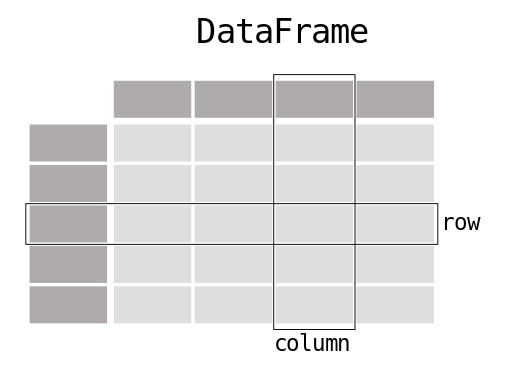
two-dimensional labeled data structure with columns of potentially different types.
# Create a pandas DataFrame
data = {
    'Country': ['Belgium', 'India', 'Brazil'],
    'Capital': ['Brussels', 'New Delhi', 'Brasília'],
    'Population': [11190846, 1303171035, 207847528]
}
df = pd.DataFrame(
    data,
    columns=['Country', 'Capital', 'Population']
)

# Print the DataFrame 'df'
print("\ndf:")
df
df:
| Country | Capital | Population | |
|---|---|---|---|
| 0 | Belgium | Brussels | 11190846 |
| 1 | India | New Delhi | 1303171035 |
| 2 | Brazil | Brasília | 207847528 |
Getting Elements
-5
| Country | Capital | Population | |
|---|---|---|---|
| 1 | India | New Delhi | 1303171035 |
| 2 | Brazil | Brasília | 207847528 |
Selecting, Boolean Indexing & Setting
| Country | |
|---|---|
| 0 | Belgium |
| Country | |
|---|---|
| 0 | Belgium |
# Select single row of subset of rows
df.loc[2]
# Output:
# Country     Brazil
# Capital    Brasília
# Population 207847528
Country          Brazil
Capital        Brasília
Population    207847528
Name: 2, dtype: object
# Select a single column of subset of columns
df.loc[:,'Capital']
# Output:
# 0     Brussels
# 1    New Delhi
# 2     Brasília
0     Brussels
1    New Delhi
2     Brasília
Name: Capital, dtype: object
b   -5
dtype: int64
a    3
b   -5
c    7
d    4
dtype: int64
| Country | Capital | Population | |
|---|---|---|---|
| 1 | India | New Delhi | 1303171035 |
a    6
b   -5
c    7
d    4
dtype: int64
Dropping
b   -5
d    4
dtype: int64
| Capital | Population | |
|---|---|---|
| 0 | Brussels | 11190846 |
| 1 | New Delhi | 1303171035 |
| 2 | Brasília | 207847528 |
Sort & Rank
| Country | Capital | Population | |
|---|---|---|---|
| 0 | Belgium | Brussels | 11190846 |
| 1 | India | New Delhi | 1303171035 |
| 2 | Brazil | Brasília | 207847528 |
| Country | Capital | Population | |
|---|---|---|---|
| 0 | Belgium | Brussels | 11190846 |
| 2 | Brazil | Brasília | 207847528 |
| 1 | India | New Delhi | 1303171035 |
| Country | Capital | Population | |
|---|---|---|---|
| 0 | 1.0 | 2.0 | 1.0 |
| 1 | 3.0 | 3.0 | 3.0 |
| 2 | 2.0 | 1.0 | 2.0 |
Applying Functions
| Country | Capital | Population | |
|---|---|---|---|
| 0 | BelgiumBelgium | BrusselsBrussels | 22381692 |
| 1 | IndiaIndia | New DelhiNew Delhi | 2606342070 |
| 2 | BrazilBrazil | BrasíliaBrasília | 415695056 |
| Country | Capital | Population | |
|---|---|---|---|
| 0 | BelgiumBelgium | BrusselsBrussels | 22381692 |
| 1 | IndiaIndia | New DelhiNew Delhi | 2606342070 |
| 2 | BrazilBrazil | BrasíliaBrasília | 415695056 |
Basic Information
(3, 3)
RangeIndex(start=0, stop=3, step=1)
Index(['Country', 'Capital', 'Population'], dtype='object')
<class 'pandas.core.frame.DataFrame'>
RangeIndex: 3 entries, 0 to 2
Data columns (total 3 columns):
 #   Column      Non-Null Count  Dtype
---  ------      --------------  -----
 0   Country     3 non-null      object
 1   Capital     3 non-null      object
 2   Population  3 non-null      int64
dtypes: int64(1), object(2)
memory usage: 200.0+ bytes
Country       3
Capital       3
Population    3
dtype: int64
Summary
# Sum of values
sum_values = df['Population'].sum()

# Cumulative sum of values
cumulative_sum_values = df['Population'].cumsum()

# Minimum/maximum values
min_values = df['Population'].min()
max_values = df['Population'].max()

# Index of minimum/maximum values
idx_min_values = df['Population'].idxmin()
idx_max_values = df['Population'].idxmax()

# Summary statistics
summary_stats = df['Population'].describe()

# Mean of values
mean_values = df['Population'].mean()

# Median of values
median_values = df['Population'].median()

print("Example DataFrame:")
print(df)

print("\nSum of values:")
print(sum_values)

print("\nCumulative sum of values:")
print(cumulative_sum_values)

print("\nMinimum values:")
print(min_values)

print("\nMaximum values:")
print(max_values)

print("\nIndex of minimum values:")
print(idx_min_values)

print("\nIndex of maximum values:")
print(idx_max_values)

print("\nSummary statistics:")
print(summary_stats)

print("\nMean values:")
print(mean_values)

print("\nMedian values:")
print(median_values)
Example DataFrame:
   Country    Capital  Population
0  Belgium   Brussels    11190846
1    India  New Delhi  1303171035
2   Brazil   Brasília   207847528

Sum of values:
1522209409

Cumulative sum of values:
0      11190846
1    1314361881
2    1522209409
Name: Population, dtype: int64

Minimum values:
11190846

Maximum values:
1303171035

Index of minimum values:
0

Index of maximum values:
1

Summary statistics:
count    3.000000e+00
mean     5.074031e+08
std      6.961346e+08
min      1.119085e+07
25%      1.095192e+08
50%      2.078475e+08
75%      7.555093e+08
max      1.303171e+09
Name: Population, dtype: float64

Mean values:
507403136.3333333

Median values:
207847528.0
Internal Data Alignment
a    7
c   -2
d    3
dtype: int64
a    13.0
b     NaN
c     5.0
d     7.0
dtype: float64
Arithmetic Operations with Fill Methods
# Example Series
s = pd.Series([3, -5, 7, 4], index=['a', 'b', 'c', 'd'])
s3 = pd.Series([10, 2, 4, 8], index=['a', 'b', 'd', 'e'])

# Perform arithmetic operations with fill methods
result_add = s.add(s3, fill_value=0)
result_sub = s.sub(s3, fill_value=2)
result_div = s.div(s3, fill_value=4)
result_mul = s.mul(s3, fill_value=3)

print("result_add:")
print(result_add)

print("\nresult_sub:")
print(result_sub)

print("\nresult_div:")
print(result_div)

print("\nresult_mul:")
print(result_mul)
result_add:
a    13.0
b    -3.0
c     7.0
d     8.0
e     8.0
dtype: float64

result_sub:
a   -7.0
b   -7.0
c    5.0
d    0.0
e   -6.0
dtype: float64

result_div:
a    0.30
b   -2.50
c    1.75
d    1.00
e    0.50
dtype: float64

result_mul:
a    30.0
b   -10.0
c    21.0
d    16.0
e    24.0
dtype: float64
Asking For Help
Help on property:

    Access a group of rows and columns by label(s) or a boolean array.

    ``.loc[]`` is primarily label based, but may also be used with a
    boolean array.

    Allowed inputs are:

    - A single label, e.g. ``5`` or ``'a'``, (note that ``5`` is
      interpreted as a *label* of the index, and **never** as an
      integer position along the index).
    - A list or array of labels, e.g. ``['a', 'b', 'c']``.
    - A slice object with labels, e.g. ``'a':'f'``.

      .. warning:: Note that contrary to usual python slices, **both** the
          start and the stop are included

    - A boolean array of the same length as the axis being sliced,
      e.g. ``[True, False, True]``.
    - An alignable boolean Series. The index of the key will be aligned before
      masking.
    - An alignable Index. The Index of the returned selection will be the input.
    - A ``callable`` function with one argument (the calling Series or
      DataFrame) and that returns valid output for indexing (one of the above)

    See more at :ref:`Selection by Label <indexing.label>`.

    Raises
    ------
    KeyError
        If any items are not found.
    IndexingError
        If an indexed key is passed and its index is unalignable to the frame index.

    See Also
    --------
    DataFrame.at : Access a single value for a row/column label pair.
    DataFrame.iloc : Access group of rows and columns by integer position(s).
    DataFrame.xs : Returns a cross-section (row(s) or column(s)) from the
        Series/DataFrame.
    Series.loc : Access group of values using labels.

    Examples
    --------
    **Getting values**

    >>> df = pd.DataFrame([[1, 2], [4, 5], [7, 8]],
    ...      index=['cobra', 'viper', 'sidewinder'],
    ...      columns=['max_speed', 'shield'])
    >>> df
                max_speed  shield
    cobra               1       2
    viper               4       5
    sidewinder          7       8

    Single label. Note this returns the row as a Series.

    >>> df.loc['viper']
    max_speed    4
    shield       5
    Name: viper, dtype: int64

    List of labels. Note using ``[[]]`` returns a DataFrame.

    >>> df.loc[['viper', 'sidewinder']]
                max_speed  shield
    viper               4       5
    sidewinder          7       8

    Single label for row and column

    >>> df.loc['cobra', 'shield']
    2

    Slice with labels for row and single label for column. As mentioned
    above, note that both the start and stop of the slice are included.

    >>> df.loc['cobra':'viper', 'max_speed']
    cobra    1
    viper    4
    Name: max_speed, dtype: int64

    Boolean list with the same length as the row axis

    >>> df.loc[[False, False, True]]
                max_speed  shield
    sidewinder          7       8

    Alignable boolean Series:

    >>> df.loc[pd.Series([False, True, False],
    ...        index=['viper', 'sidewinder', 'cobra'])]
                max_speed  shield
    sidewinder          7       8

    Index (same behavior as ``df.reindex``)

    >>> df.loc[pd.Index(["cobra", "viper"], name="foo")]
           max_speed  shield
    foo
    cobra          1       2
    viper          4       5

    Conditional that returns a boolean Series

    >>> df.loc[df['shield'] > 6]
                max_speed  shield
    sidewinder          7       8

    Conditional that returns a boolean Series with column labels specified

    >>> df.loc[df['shield'] > 6, ['max_speed']]
                max_speed
    sidewinder          7

    Callable that returns a boolean Series

    >>> df.loc[lambda df: df['shield'] == 8]
                max_speed  shield
    sidewinder          7       8

    **Setting values**

    Set value for all items matching the list of labels

    >>> df.loc[['viper', 'sidewinder'], ['shield']] = 50
    >>> df
                max_speed  shield
    cobra               1       2
    viper               4      50
    sidewinder          7      50

    Set value for an entire row

    >>> df.loc['cobra'] = 10
    >>> df
                max_speed  shield
    cobra              10      10
    viper               4      50
    sidewinder          7      50

    Set value for an entire column

    >>> df.loc[:, 'max_speed'] = 30
    >>> df
                max_speed  shield
    cobra              30      10
    viper              30      50
    sidewinder         30      50

    Set value for rows matching callable condition

    >>> df.loc[df['shield'] > 35] = 0
    >>> df
                max_speed  shield
    cobra              30      10
    viper               0       0
    sidewinder          0       0

    **Getting values on a DataFrame with an index that has integer labels**

    Another example using integers for the index

    >>> df = pd.DataFrame([[1, 2], [4, 5], [7, 8]],
    ...      index=[7, 8, 9], columns=['max_speed', 'shield'])
    >>> df
       max_speed  shield
    7          1       2
    8          4       5
    9          7       8

    Slice with integer labels for rows. As mentioned above, note that both
    the start and stop of the slice are included.

    >>> df.loc[7:9]
       max_speed  shield
    7          1       2
    8          4       5
    9          7       8

    **Getting values with a MultiIndex**

    A number of examples using a DataFrame with a MultiIndex

    >>> tuples = [
    ...    ('cobra', 'mark i'), ('cobra', 'mark ii'),
    ...    ('sidewinder', 'mark i'), ('sidewinder', 'mark ii'),
    ...    ('viper', 'mark ii'), ('viper', 'mark iii')
    ... ]
    >>> index = pd.MultiIndex.from_tuples(tuples)
    >>> values = [[12, 2], [0, 4], [10, 20],
    ...         [1, 4], [7, 1], [16, 36]]
    >>> df = pd.DataFrame(values, columns=['max_speed', 'shield'], index=index)
    >>> df
                         max_speed  shield
    cobra      mark i           12       2
               mark ii           0       4
    sidewinder mark i           10      20
               mark ii           1       4
    viper      mark ii           7       1
               mark iii         16      36

    Single label. Note this returns a DataFrame with a single index.

    >>> df.loc['cobra']
             max_speed  shield
    mark i          12       2
    mark ii          0       4

    Single index tuple. Note this returns a Series.

    >>> df.loc[('cobra', 'mark ii')]
    max_speed    0
    shield       4
    Name: (cobra, mark ii), dtype: int64

    Single label for row and column. Similar to passing in a tuple, this
    returns a Series.

    >>> df.loc['cobra', 'mark i']
    max_speed    12
    shield        2
    Name: (cobra, mark i), dtype: int64

    Single tuple. Note using ``[[]]`` returns a DataFrame.

    >>> df.loc[[('cobra', 'mark ii')]]
                   max_speed  shield
    cobra mark ii          0       4

    Single tuple for the index with a single label for the column

    >>> df.loc[('cobra', 'mark i'), 'shield']
    2

    Slice from index tuple to single label

    >>> df.loc[('cobra', 'mark i'):'viper']
                         max_speed  shield
    cobra      mark i           12       2
               mark ii           0       4
    sidewinder mark i           10      20
               mark ii           1       4
    viper      mark ii           7       1
               mark iii         16      36

    Slice from index tuple to index tuple

    >>> df.loc[('cobra', 'mark i'):('viper', 'mark ii')]
                        max_speed  shield
    cobra      mark i          12       2
               mark ii          0       4
    sidewinder mark i          10      20
               mark ii          1       4
    viper      mark ii          7       1
Read and Write
CSV
# Read from CSV
df_read = pd.read_csv(
    'file.csv',
     header=None,
     nrows=5
)

# Write to CSV
df.to_csv('myDataFrame.csv')
Excel
# Read from Excel
df_read_excel = pd.read_excel('file.xlsx')

# Write to Excel
df.to_excel(
    'dir/myDataFrame.xlsx',
    sheet_name='Sheet1'
)

# Read multiple sheets from the same file
xlsx = pd.ExcelFile('file.xls')
df_from_sheet1 = pd.read_excel(xlsx, 'Sheet1')
SQL Query
from sqlalchemy import create_engine
engine = create_engine('sqlite:///:memory:')

# Read from SQL Query
pd.read_sql("SELECT * FROM my_table;", engine)

# Read from Database Table
pd.read_sql_table('my_table', engine)

# Read from SQL Query using read_sql_query()
pd.read_sql_query("SELECT * FROM my_table;", engine)

# Write DataFrame to SQL Table
pd.to_sql('myDf', engine)