
Pandas II

"Pandas es a los datos tabulares lo que NumPy es a los arreglos numéricos: la herramienta que hace que todo lo demás tenga sentido."
Introducción
En Pandas I aprendiste a cargar, explorar, filtrar y limpiar datos. En esta clase vas un paso más allá: agregar, combinar y reshapear DataFrames, y terminas con una primera mirada a Seaborn para visualizar los resultados.
En este módulo aprenderás a:
- Agrupar y resumir datos con
groupby - Combinar tablas con
concatymerge - Cambiar la forma de una tabla con
pivotymelt - Visualizar datos estadísticos con Seaborn básico
import pandas as pd
import numpy as np
import seaborn as sns
import matplotlib.pyplot as plt

# Dataset NBA Players
path = "https://raw.githubusercontent.com/fralfaro/MAT281/main/docs/lectures/data_manipulation/data/player_info.csv"
df = pd.read_csv(path).dropna()
df["decade"] = df["year_start"].apply(lambda x: "2000s" if x >= 2000 else "1900s")
df.head()
| name | year_start | year_end | position | height | weight | birth_date | college | decade | |
|---|---|---|---|---|---|---|---|---|---|
| 2 | Zaid Abdul-Aziz | 1969 | 1978 | C-F | 6-9 | 235.0 | April 7, 1946 | Iowa State University | 1900s |
| 3 | Kareem Abdul-Jabbar | 1970 | 1989 | C | 7-2 | 225.0 | April 16, 1947 | University of California, Los Angeles | 1900s |
| 4 | Mahmoud Abdul-Rauf | 1991 | 2001 | G | 6-1 | 162.0 | March 9, 1969 | Louisiana State University | 1900s |
| 5 | Tariq Abdul-Wahad | 1998 | 2003 | F | 6-6 | 223.0 | November 3, 1974 | San Jose State University | 1900s |
| 6 | Shareef Abdur-Rahim | 1997 | 2008 | F | 6-9 | 225.0 | December 11, 1976 | University of California | 1900s |
Groupby
Groupby divide el DataFrame en grupos, aplica una función a cada grupo,
y combina los resultados. Es el equivalente a un GROUP BY en SQL.
dividir → aplicar → combinar

Agrupar por una columna
# Peso promedio por posición
df.groupby("position")["weight"].mean()
| weight | |
|---|---|
| position | |
| C | 242.219212 |
| C-F | 228.256158 |
| F | 217.985857 |
| F-C | 222.871866 |
| F-G | 202.604878 |
| G | 186.828115 |
| G-F | 197.017857 |
Agrupar por varias columnas
# Peso promedio por década y posición
df.groupby(["decade", "position"])["weight"].mean().head(10)
| weight | ||
|---|---|---|
| decade | position | |
| 1900s | C | 237.453642 |
| C-F | 224.871345 | |
| F | 212.582933 | |
| F-C | 217.908475 | |
| F-G | 200.594444 | |
| G | 182.689150 | |
| G-F | 192.789062 | |
| 2000s | C | 256.057692 |
| C-F | 246.343750 | |
| F | 230.135135 |
Múltiples funciones
# Estadísticas de peso y año de inicio por grupo
df.groupby(["decade", "position"]).agg({
    "weight":     ["min", "max", "mean"],
    "year_start": ["min", "max"]
}).head()
| weight | year_start | |||||
|---|---|---|---|---|---|---|
| min | max | mean | min | max | ||
| decade | position | |||||
| 1900s | C | 190.0 | 330.0 | 237.453642 | 1947 | 1999 |
| C-F | 185.0 | 270.0 | 224.871345 | 1947 | 1998 | |
| F | 165.0 | 284.0 | 212.582933 | 1947 | 1999 | |
| F-C | 180.0 | 290.0 | 217.908475 | 1947 | 1999 | |
| F-G | 165.0 | 245.0 | 200.594444 | 1947 | 1999 | |
Función personalizada
def promedio_armonico(serie):
    return len(serie) / sum(1 / x for x in serie)

df.groupby(["decade", "position"])["weight"].apply(promedio_armonico).head()
| weight | ||
|---|---|---|
| decade | position | |
| 1900s | C | 235.811208 |
| C-F | 223.766067 | |
| F | 211.205181 | |
| F-C | 216.785001 | |
| F-G | 199.669744 |
Transform
El transform es útil para comparar cada registro contra su grupo,
por ejemplo:
df["peso_vs_media"] = df["weight"] - df["mean_weight_group"]
# Agrega la media del grupo como nueva columna (mantiene el índice original)
df["mean_weight_group"] = df.groupby(["decade", "position"])["weight"].transform("mean")
df[["name", "position", "decade", "weight", "mean_weight_group"]].head()
| name | position | decade | weight | mean_weight_group | |
|---|---|---|---|---|---|
| 2 | Zaid Abdul-Aziz | C-F | 1900s | 235.0 | 224.871345 |
| 3 | Kareem Abdul-Jabbar | C | 1900s | 225.0 | 237.453642 |
| 4 | Mahmoud Abdul-Rauf | G | 1900s | 162.0 | 182.689150 |
| 5 | Tariq Abdul-Wahad | F | 1900s | 223.0 | 212.582933 |
| 6 | Shareef Abdur-Rahim | F | 1900s | 225.0 | 212.582933 |
Filter
# Solo posiciones cuyo peso promedio supera 220 lbs
df.groupby("position").filter(lambda x: x["weight"].mean() > 220).head()
| name | year_start | year_end | position | height | weight | birth_date | college | decade | mean_weight_group | |
|---|---|---|---|---|---|---|---|---|---|---|
| 2 | Zaid Abdul-Aziz | 1969 | 1978 | C-F | 6-9 | 235.0 | April 7, 1946 | Iowa State University | 1900s | 224.871345 |
| 3 | Kareem Abdul-Jabbar | 1970 | 1989 | C | 7-2 | 225.0 | April 16, 1947 | University of California, Los Angeles | 1900s | 237.453642 |
| 13 | Mark Acres | 1988 | 1993 | F-C | 6-11 | 220.0 | November 15, 1962 | Oral Roberts University | 1900s | 217.908475 |
| 16 | Alvan Adams | 1976 | 1988 | C-F | 6-9 | 210.0 | July 19, 1954 | University of Oklahoma | 1900s | 224.871345 |
| 22 | Steven Adams | 2014 | 2018 | C | 7-0 | 255.0 | July 20, 1993 | University of Pittsburgh | 2000s | 256.057692 |
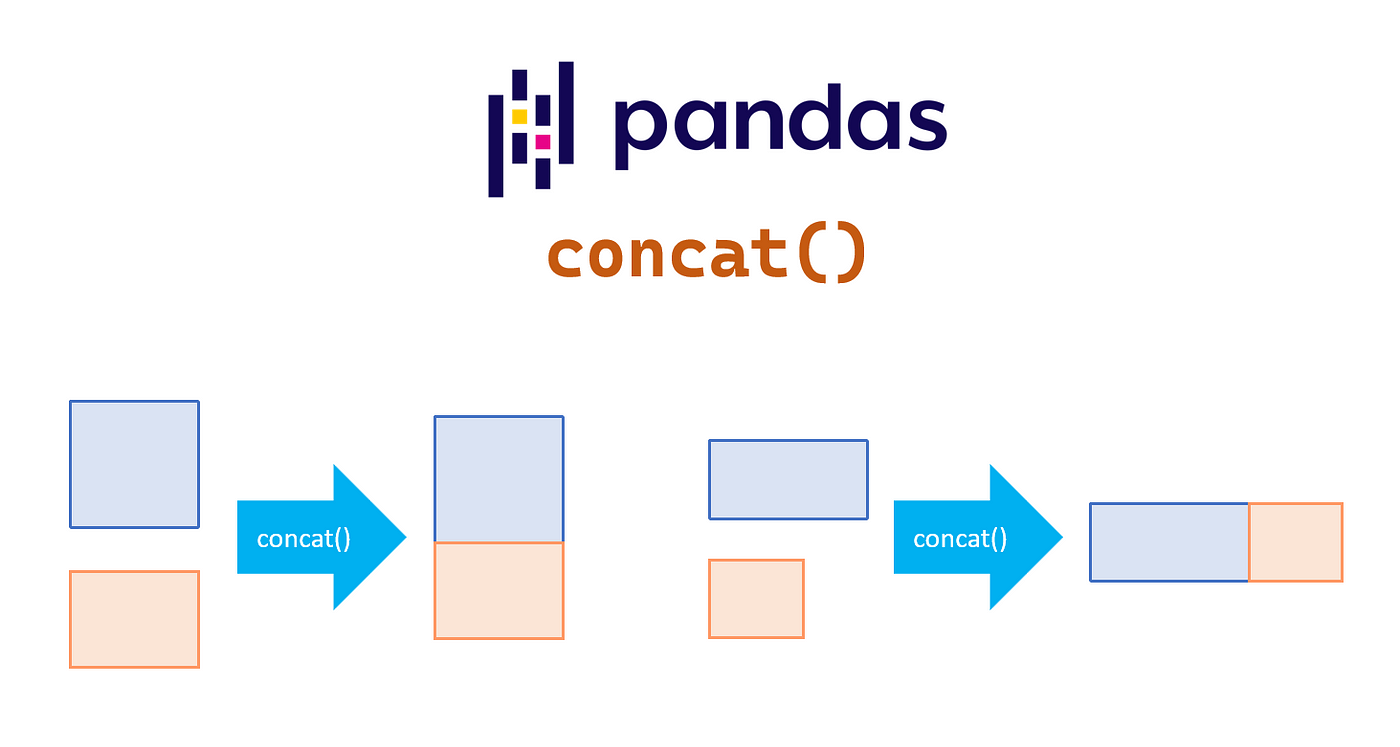
df_antes_2000  = df.loc[df["year_start"] < 2000]
df_desde_2000  = df.loc[df["year_start"] >= 2000]

# Mismas columnas → apila filas
result = pd.concat([df_antes_2000, df_desde_2000])
print(result.shape)   # misma cantidad de columnas
(4212, 10)
Si las columnas no coinciden exactamente, pandas rellena con NaN:
df_desde_2000_mod = df_desde_2000.rename(columns={"birth_date": "birth"})
result = pd.concat([df_antes_2000, df_desde_2000_mod])
result.columns   # aparecen birth_date Y birth como columnas separadas
Index(['name', 'year_start', 'year_end', 'position', 'height', 'weight',
       'birth_date', 'college', 'decade', 'mean_weight_group', 'birth'],
      dtype='object')
Usa ignore_index=True si quieres resetear el índice después de concatenar: pd.concat([df1, df2], ignore_index=True)
Merge
El pd.merge() combina dos DataFrames por una o más columnas comunes.
Es el equivalente a un JOIN en SQL.
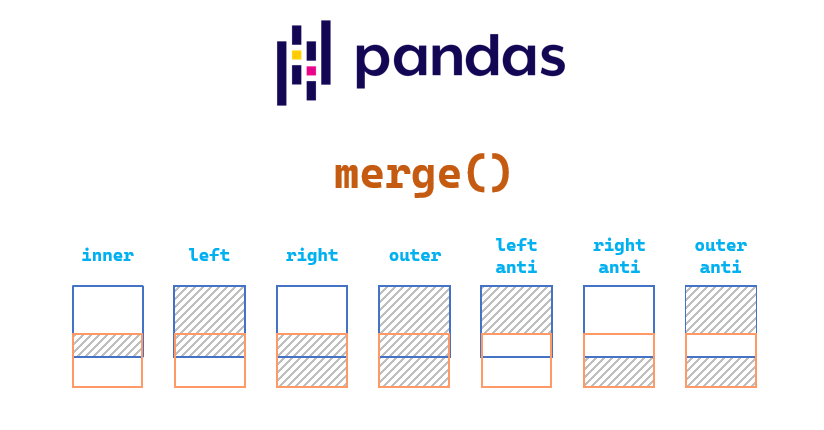
df_info    = df[["name", "year_start", "year_end", "position"]]
df_fisico  = df[["name", "height", "weight", "college"]]

# Inner join por nombre
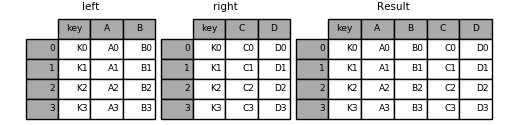
result = pd.merge(df_info, df_fisico, on="name")
result.head()
| name | year_start | year_end | position | height | weight | college | |
|---|---|---|---|---|---|---|---|
| 0 | Zaid Abdul-Aziz | 1969 | 1978 | C-F | 6-9 | 235.0 | Iowa State University |
| 1 | Kareem Abdul-Jabbar | 1970 | 1989 | C | 7-2 | 225.0 | University of California, Los Angeles |
| 2 | Mahmoud Abdul-Rauf | 1991 | 2001 | G | 6-1 | 162.0 | Louisiana State University |
| 3 | Tariq Abdul-Wahad | 1998 | 2003 | F | 6-6 | 223.0 | San Jose State University |
| 4 | Shareef Abdur-Rahim | 1997 | 2008 | F | 6-9 | 225.0 | University of California |
Por un columna
Por Varias columnas

Tipos de merge
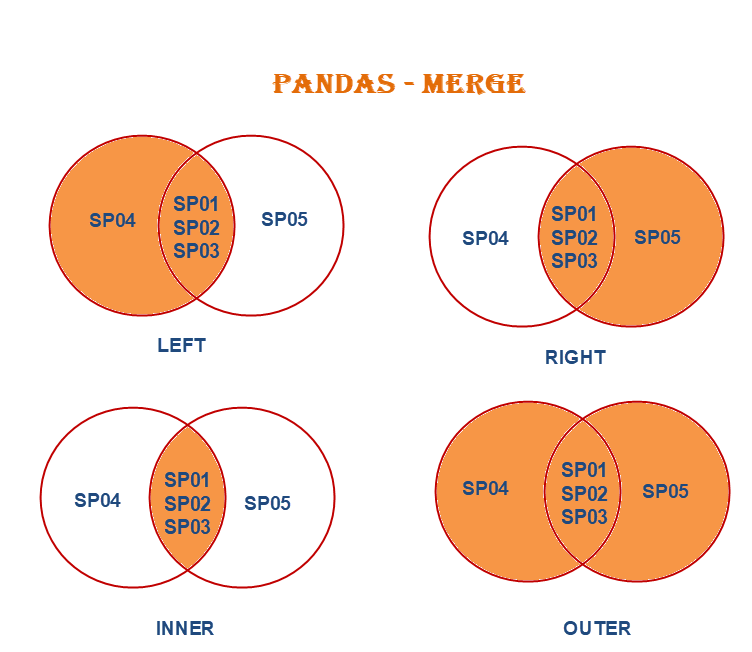
La opción how especificica el tipo de cruce que se realizará.
| Tipo | Descripción | SQL equivalente |
|---|---|---|
inner |
Solo filas con coincidencia en ambas tablas | INNER JOIN |
left |
Todas las filas de la izquierda | LEFT JOIN |
right |
Todas las filas de la derecha | RIGHT JOIN |
outer |
Unión de ambas tablas | FULL OUTER JOIN |
print("inner join — solo coincidencias en ambas tablas")
display(pd.merge(df_info, df_fisico, on="name", how="inner").head())

print("left join — todas las filas de df_info")
display(pd.merge(df_info, df_fisico, on="name", how="left").head())

print("outer join — unión completa de ambas tablas")
display(pd.merge(df_info, df_fisico, on="name", how="outer").head())
inner join — solo coincidencias en ambas tablas
| name | year_start | year_end | position | height | weight | college | |
|---|---|---|---|---|---|---|---|
| 0 | Zaid Abdul-Aziz | 1969 | 1978 | C-F | 6-9 | 235.0 | Iowa State University |
| 1 | Kareem Abdul-Jabbar | 1970 | 1989 | C | 7-2 | 225.0 | University of California, Los Angeles |
| 2 | Mahmoud Abdul-Rauf | 1991 | 2001 | G | 6-1 | 162.0 | Louisiana State University |
| 3 | Tariq Abdul-Wahad | 1998 | 2003 | F | 6-6 | 223.0 | San Jose State University |
| 4 | Shareef Abdur-Rahim | 1997 | 2008 | F | 6-9 | 225.0 | University of California |
left join — todas las filas de df_info
| name | year_start | year_end | position | height | weight | college | |
|---|---|---|---|---|---|---|---|
| 0 | Zaid Abdul-Aziz | 1969 | 1978 | C-F | 6-9 | 235.0 | Iowa State University |
| 1 | Kareem Abdul-Jabbar | 1970 | 1989 | C | 7-2 | 225.0 | University of California, Los Angeles |
| 2 | Mahmoud Abdul-Rauf | 1991 | 2001 | G | 6-1 | 162.0 | Louisiana State University |
| 3 | Tariq Abdul-Wahad | 1998 | 2003 | F | 6-6 | 223.0 | San Jose State University |
| 4 | Shareef Abdur-Rahim | 1997 | 2008 | F | 6-9 | 225.0 | University of California |
outer join — unión completa de ambas tablas
| name | year_start | year_end | position | height | weight | college | |
|---|---|---|---|---|---|---|---|
| 0 | A.C. Green | 1986 | 2001 | F-C | 6-9 | 220.0 | Oregon State University |
| 1 | A.J. Bramlett | 2000 | 2000 | C | 6-10 | 227.0 | University of Arizona |
| 2 | A.J. English | 1991 | 1992 | G | 6-3 | 175.0 | Virginia Union University |
| 3 | A.J. Guyton | 2001 | 2003 | G | 6-1 | 180.0 | Indiana University |
| 4 | A.J. Hammons | 2017 | 2017 | C | 7-0 | 260.0 | Purdue University |
Columnas duplicadas
Cuando ambas tablas tienen una columna con el mismo nombre que no es la clave,
pandas la renombra automáticamente con sufijos _x e _y:
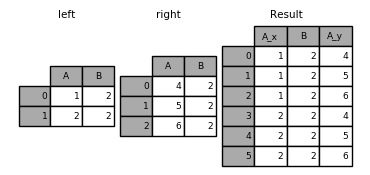
df_a = df[["name", "year_start", "year_end", "position"]]
df_b = df[["name", "year_start", "year_end", "height"]]

# year_end aparece en ambas pero no es la clave → year_end_x, year_end_y
pd.merge(df_a, df_b, on=["name", "year_start"]).head()
| name | year_start | year_end_x | position | year_end_y | height | |
|---|---|---|---|---|---|---|
| 0 | Zaid Abdul-Aziz | 1969 | 1978 | C-F | 1978 | 6-9 |
| 1 | Kareem Abdul-Jabbar | 1970 | 1989 | C | 1989 | 7-2 |
| 2 | Mahmoud Abdul-Rauf | 1991 | 2001 | G | 2001 | 6-1 |
| 3 | Tariq Abdul-Wahad | 1998 | 2003 | F | 2003 | 6-6 |
| 4 | Shareef Abdur-Rahim | 1997 | 2008 | F | 2008 | 6-9 |
Formatos wide y long

Los datos tabulares pueden presentarse en dos formatos:
| Formato | Descripción | Cuándo usarlo |
|---|---|---|
| Wide | Cada variable tiene su propia columna | Análisis, ML |
| Long | Una columna de variable + una de valor | Visualización, groupby |
long a wide: pivot
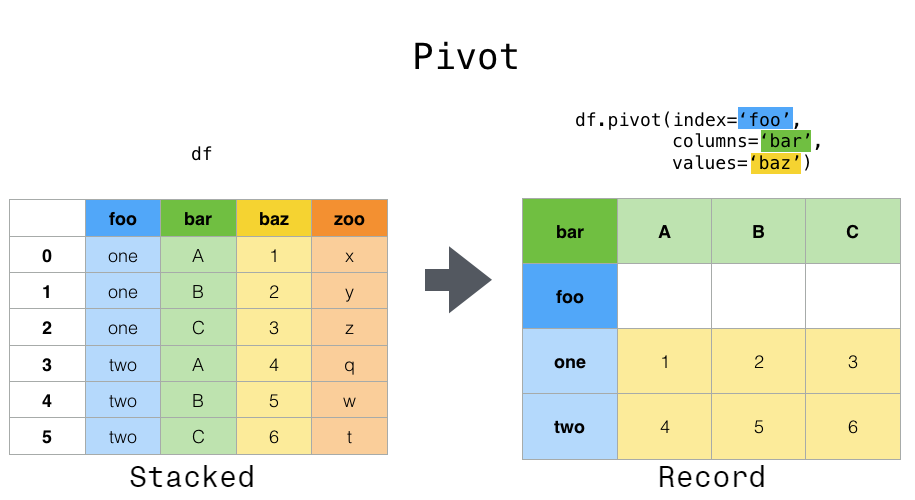
# Peso promedio por década (filas) y posición (columnas)
pivot = df.pivot_table(
    index="decade",
    columns="position",
    values="weight",
    aggfunc="mean"
)
pivot
| position | C | C-F | F | F-C | F-G | G | G-F |
|---|---|---|---|---|---|---|---|
| decade | |||||||
| 1900s | 237.453642 | 224.871345 | 212.582933 | 217.908475 | 200.594444 | 182.689150 | 192.789062 |
| 2000s | 256.057692 | 246.343750 | 230.135135 | 245.750000 | 217.080000 | 195.686192 | 210.550000 |
# pivot: simple
agrupado = df.groupby(['decade','position'])['weight'].mean().reset_index()
pivot_df = agrupado.pivot(index='decade', columns='position', values='weight')
pivot_df.head(10)
| position | C | C-F | F | F-C | F-G | G | G-F |
|---|---|---|---|---|---|---|---|
| decade | |||||||
| 1900s | 237.453642 | 224.871345 | 212.582933 | 217.908475 | 200.594444 | 182.689150 | 192.789062 |
| 2000s | 256.057692 | 246.343750 | 230.135135 | 245.750000 | 217.080000 | 195.686192 | 210.550000 |
# Pivot con múltiples índices
pivot_multi = df.pivot_table(
    index=["decade", "height"],
    columns="position",
    values="weight",
    aggfunc="mean"
).fillna(0)
pivot_multi.head()
| position | C | C-F | F | F-C | F-G | G | G-F | |
|---|---|---|---|---|---|---|---|---|
| decade | height | |||||||
| 1900s | 5-10 | 0.0 | 0.0 | 0.0 | 0.0 | 0.0 | 167.914286 | 163.333333 |
| 5-11 | 0.0 | 0.0 | 0.0 | 0.0 | 175.0 | 171.666667 | 171.666667 | |
| 5-3 | 0.0 | 0.0 | 0.0 | 0.0 | 0.0 | 136.000000 | 0.000000 | |
| 5-5 | 0.0 | 0.0 | 0.0 | 0.0 | 0.0 | 135.000000 | 0.000000 | |
| 5-6 | 0.0 | 0.0 | 0.0 | 0.0 | 0.0 | 149.000000 | 0.000000 |
Wide → Long: melt
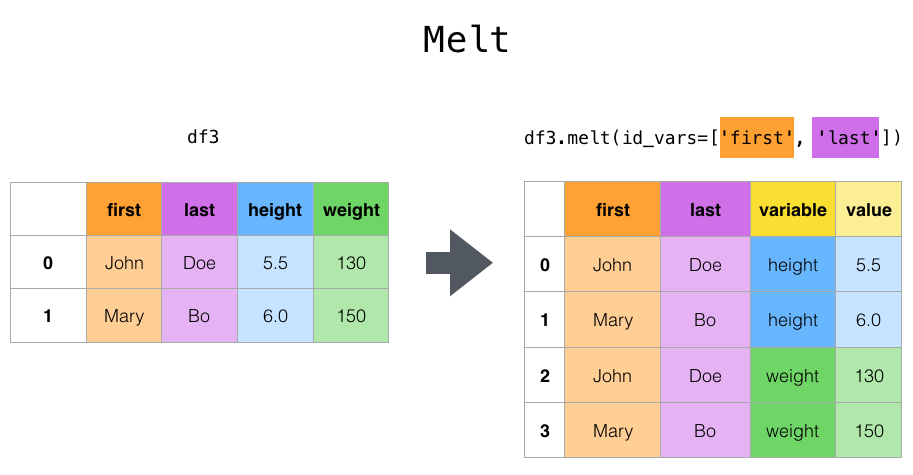
# Tenemos tabla wide
df_wide = df.pivot_table(
    index=["name", "year_start", "year_end"],
    columns="position",
    values="weight",
    aggfunc="mean"
).fillna(0).reset_index()
df_wide.columns.name = None

# Volver a long
df_long = df_wide.melt(
    id_vars=["name", "year_start", "year_end"],
    var_name="position",
    value_name="weight"
)
df_long.head()
| name | year_start | year_end | position | weight | |
|---|---|---|---|---|---|
| 0 | A.C. Green | 1986 | 2001 | C | 0.0 |
| 1 | A.J. Bramlett | 2000 | 2000 | C | 227.0 |
| 2 | A.J. English | 1991 | 1992 | C | 0.0 |
| 3 | A.J. Guyton | 2001 | 2003 | C | 0.0 |
| 4 | A.J. Hammons | 2017 | 2017 | C | 260.0 |